Free Messages, Subscriptions and Restoring Purchases in AniSoul and RealSoul
AniSoul and RealSoul are free every day with a message allowance. What a subscription changes, how renewal and cancelling work, and how to restore it.
Free Messages, Subscriptions and Restoring Purchases in AniSoul and RealSoul 💬
AniSoul and RealSoul are free to use every day. Each day comes with a number of free messages, and an optional subscription removes that daily limit. Neither app has an account, so buying, cancelling and restoring a subscription all go through your Apple Account.
This post covers how the free allowance is counted, what a subscription changes and what it does not, how renewal and cancelling work, and what to do after reinstalling or on a new iPhone or iPad.
📋 The Short Version
| Question | Answer |
|---|---|
| Is it free? | Yes, every day, with a daily message allowance: 30 messages a day at the time of writing |
| What does a subscription do? | It removes the daily message limit. Nothing else changes |
| What does it cost? | 1 week US$2.99 · 1 month US$9.99 · 1 year US$59.99. Your local price is shown before you confirm |
| Does one subscription cover both apps? | No. AniSoul Unlimited and RealSoul No Daily Limit are separate purchases, at the same prices |
| Is there an account? | No. A subscription belongs to your Apple Account |
| Where do I cancel? | Settings > Apple Account > Subscriptions on the device |
| Reinstalled, or on a new device? | Use Restore Purchases in the app |
🔢 How the Free Allowance Works
Both apps give you a daily message allowance: 30 messages a day at the time of writing. The number can change in a later version, so treat the app as the authority on today's figure.
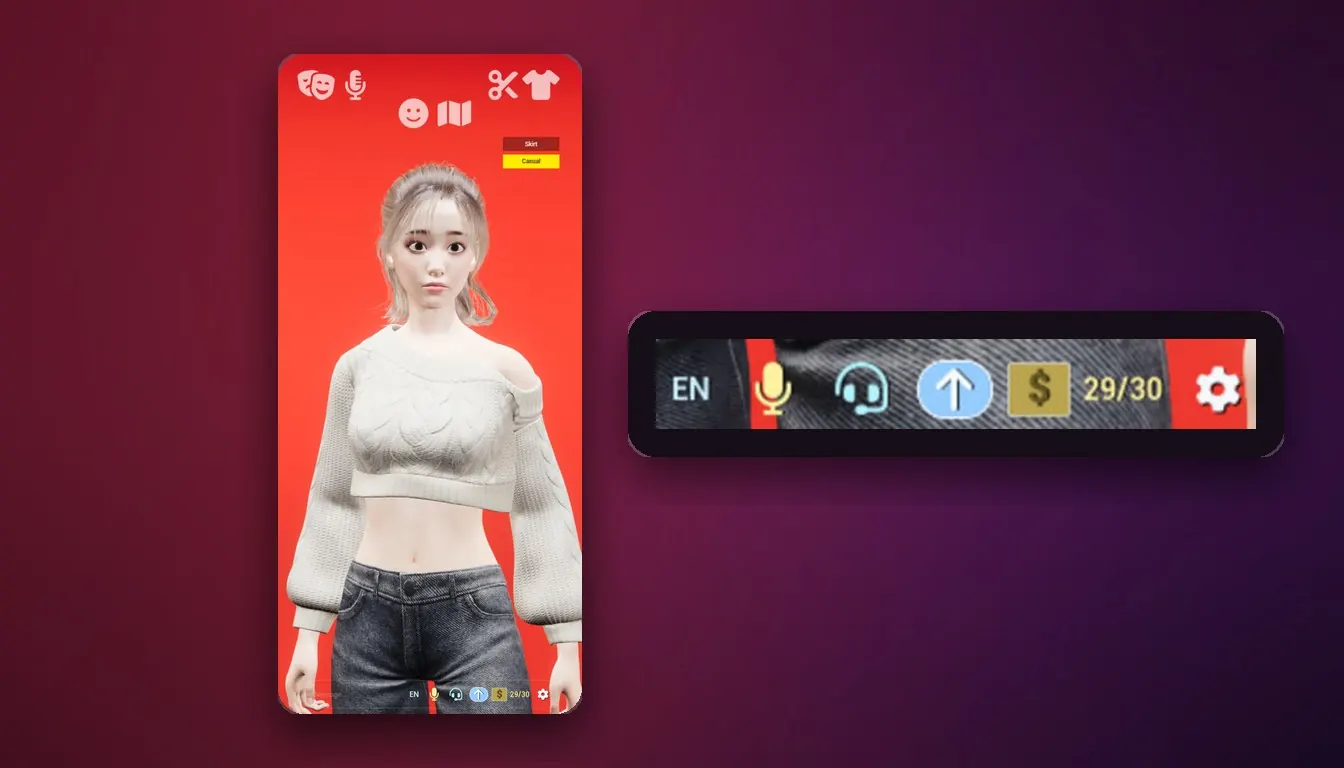
A counter next to the message box shows how many free messages you have left today. In RealSoul it reads, for example, 29/30.
The count is kept in one of two places:
- When the app can reach our server, the server meters the allowance. It uses a device identifier provided by iOS and a count of messages sent.
- When it cannot, for example in Airplane Mode, a counter stored on the device keeps the count.
That second part exists because conversations do not need a connection: once the language model is on the device, a whole conversation works offline, and the device keeps counting while it is.
When the counter reaches zero, you have used today's free messages. You can carry on another day, or subscribe.
✨ What a Subscription Changes
One thing: it removes the daily message limit. The AniSoul listing describes it as unlimited daily messages; the RealSoul subscription is simply called No Daily Limit.
Everything else is the same app, subscribed or not:
- the same character, with the same voice conversation and text chat;
- the same styling options, such as hairstyles and outfits;
- the same on-device model, so conversations still stay on your device and still work offline;
- the same small set of data reaching us, plus your App Store receipt once you subscribe (see below).
If 30 messages a day is enough for you, the free version is the whole app.
🛒 Subscribing
You subscribe from inside the app, through the App Store's own purchase sheet.
| AniSoul | RealSoul | |
|---|---|---|
| Subscription | AniSoul Unlimited | RealSoul No Daily Limit |
| 1 week | US$2.99 | US$2.99 |
| 1 month | US$9.99 | US$9.99 |
| 1 year | US$59.99 | US$59.99 |
- Prices are listed in US dollars and vary by territory. The app shows the price in your local currency before you confirm.
- Payment is charged to your Apple Account when you confirm the purchase.
- The two apps are separate purchases. A subscription in AniSoul removes the limit in AniSoul only, and the same goes for RealSoul. If you use both, decide for each one on its own.
🔁 Renewal and Cancelling
All three lengths are auto-renewable subscriptions, the one-week plan included.
- A subscription renews automatically for the same period at the same price.
- Your Apple Account is charged within the 24 hours before the current period ends.
- To stop the next renewal, turn auto-renew off at least 24 hours before the period ends.
To cancel, or to manage what you have, open Settings > Apple Account > Subscriptions on your iPhone or iPad and choose AniSoul or RealSoul.
Cancelling stops the next renewal. That is how Apple subscriptions work: the subscription stays active for the rest of the period you have already paid for, and does not renew after it.
Deleting the app does not cancel the subscription. It belongs to your Apple Account, not to the copy of the app on your phone, so it keeps renewing until you turn auto-renew off in Settings.
♻️ Restore Purchases
There is nothing to log into in AniSoul or RealSoul: no account, no email, no sign-up. So we do not hold your subscription under a username. It lives with your Apple Account, and the app checks it from there.
After reinstalling, or on a new iPhone or iPad:
- Install the app from the App Store and open it.
- Check that the device is using the same Apple Account that bought the subscription.
- Tap Restore Purchases in the app.
Restore brings back the subscription. It does not bring back conversations. They live only on the device that had them, and with no account there is no server copy to restore them from, so plan on starting fresh with her if you delete the app or move to a new phone.
🔒 What Payments Tell Us
Payment itself happens between you and Apple. What reaches us, on our own servers:
| What | Why |
|---|---|
| Your App Store receipt | To validate your subscription and to restore it |
| A device identifier provided by iOS | To meter the daily free messages |
| A count of messages sent | The same |
What does not reach us: your messages, your microphone audio, your prompts or her memories. None of it leaves the device. There is no email or name either, because there is no account. What we do receive is not sold, and not used for advertising or cross-app tracking. The details are in the Privacy Policy.
🧾 Refunds and Billing Questions
Subscriptions are bought through the App Store, so refund requests go through Apple, at reportaproblem.apple.com, and Apple decides them under its own policy.
For anything else, such as a counter that looks wrong or a restore that did not bring your subscription back, write to service@allianceinterstellar.com. Include your device model, your iOS version and the app version; it saves a round of questions.
📚 Read Next
- The full terms: Subscriptions and Payments
- Getting Started with AniSoul: Your First Day
- Getting Started with RealSoul: Your First Day
Prices, the daily allowance and plans can change between versions. The current app, its App Store listing and our Terms are authoritative.